


Currency Converter: Exchange
4.557.00 Reviews
App Specs
- Version
- 10.1.0.1
- Updated On
- License
- Free
- Downloads
- 100,000+
- Developer
- Wallet Passes Alliance
- Categories
- Travel & Local
- Platform
- Android
Screenshots
 Analysis by AppCompare
If you've ever found yourself scratching your head at currency exchange rates while traveling or shopping online, you're in good company. Enter Currency Converter: Exchange, a nifty little app that promises to make converting between currencies as easy as pie. I gave it a whirl, and here’s the lowdown on how it stacks up.
Where a quick conversion can go wrong
The most useful way to approach a currency converter is as a guide to the exchange rate, not a promise of the amount that will leave your account. If I’m comparing the price of a meal, checking an online listing, or deciding whether a souvenir fits my budget, a conversion gives me a common scale. The final charge can still differ because a bank, card issuer, exchange counter, or seller may use its own rate and fees.
That distinction matters most when I need to make a decision quickly. Before paying, I’d use the app to estimate the local-currency cost, then check the amount and currency shown at checkout or on the payment terminal. If those figures don’t match, I would trust the actual transaction details for what I’ll be charged and use the converter to understand the difference rather than treating it as a receipt calculator.
A second point of friction is choosing the correct currency. Several countries use dollars or pesos, so the currency name alone may not be enough when setting up a comparison. I take a moment to check the country or currency code shown in the app before entering an amount. That small habit can prevent a convincing-looking but irrelevant result, especially when I’m comparing prices across multiple destinations.
Setup checks before relying on a result
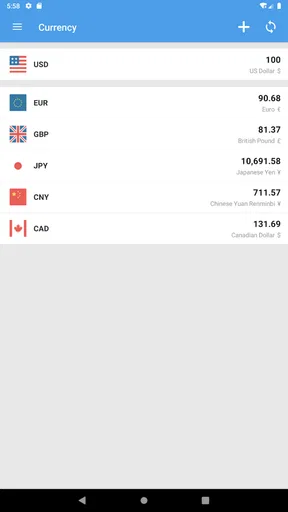
Kicking things off, downloading and setting up Currency Converter: Exchange was a breeze. Available for both Android and iOS, the app installs swiftly and doesn’t hog much storage space. Once you fire it up, you’re greeted with a clean and intuitive interface that even your tech-challenged aunt could navigate.
It is a free travel and local app from Wallet Passes Alliance, with a 4.6 average from around 6,700 ratings and over 100,000 installs. It is rated for Everyone, and the Android release is listed as version 10.1.0.1 with Android 6.0 as the minimum. Those details make it an approachable option for ordinary trip planning, though I’d still check that the version available for my device is compatible before relying on it for an upcoming journey.
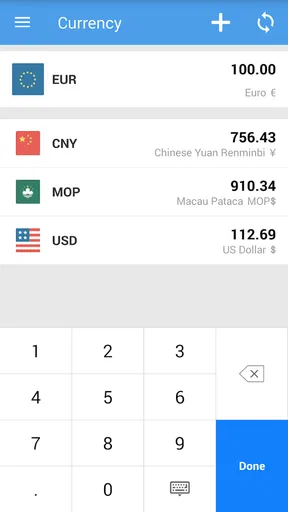
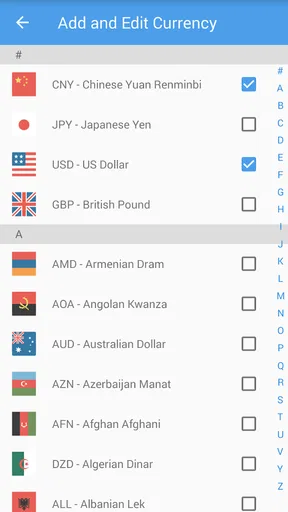
The app supports a wide variety of currencies, which is a lifesaver for globetrotters and online shoppers alike. Whether you’re dealing with the strong yen or the volatile peso, this app has you covered. Setting up your preferred currencies for quick access is a cinch, and the real-time exchange rate updates mean you’re always working with the latest figures.
Worth Reading Before You Choose

Flipboard Shows What News Apps Must Do Beyond the Feed

Switching to Android Auto Means Rethinking Your Driving Routine

Google Calendar Makes a Crowded Week Easier to Manage

Ludo King Makes the Most of the Minutes Between Plans

Baby Panda World Brings Quick Play to Modern Phones, but Its Game Library Feels Busy

ESPN’s Live Game View Makes Following Close Games Easier
For a smoother first use, I’d set the currencies I expect to compare before I’m standing in a queue or trying to plan a purchase on a weak connection. I’d also enter a familiar amount and check that the result looks plausible before using the app for a bigger decision. This is not a special calculation trick; it is simply a quick way to catch a swapped currency or a misplaced decimal while I have time to correct it.
Using the converter with confidence
I use this section to focus on a small habit that makes quick conversions more dependable: treat each result as an estimate, then verify the currency and final amount wherever a purchase is actually completed. That distinction is especially helpful when moving between offline browsing and a connected checkout, where a saved rate and a provider’s charge may not match.
Features That Stand Out
One of the standout features of this app is its offline mode. I can’t tell you how many times I’ve been stuck without internet access in a foreign country and needed to do some quick conversions. With Currency Converter: Exchange, the last updated rates are stored for offline use, which is a godsend.
The key trade-off is that an offline result relies on the last rates saved, rather than a fresh update. If I know I’ll be away from reliable service, I’d open the app while connected beforehand so its stored figures are as current as possible. Later, if a conversion seems surprising, I’d treat that as a cue to reconnect and refresh before making a significant purchase. Offline access is helpful for orientation; it shouldn’t be mistaken for a live quote.
The app also offers historical charts, which can be super handy if you’re into market trends or just want to see how your travel budget might stretch over time. I spent a good chunk of time playing around with this feature, and it’s surprisingly addicting to see how currencies have fared against each other over the months and years.
I find those charts more useful for context than for trying to predict what a currency will do next. For example, someone planning a trip well ahead could look at how a rate has moved over time and decide whether to keep an eye on it, while still budgeting with a margin for change. A chart can explain why today’s conversion differs from a number remembered from a past trip, but it cannot guarantee a future rate or tell me what a payment provider will charge.
How I’d use it on an ordinary trip
Imagine I’m in a café abroad, looking at a menu with prices I don’t yet recognize. I can enter one of the listed amounts and get a quick sense of its value in my home currency, then compare a few items without repeatedly doing mental arithmetic. If the connection has dropped, the saved rate can still help me judge whether the price is roughly within budget. For an unusually expensive meal or an important booking, I’d reconnect if possible and confirm the total at the point of payment.
For online shopping, I’d use the same approach when a product is priced in another currency: convert the listed amount to get a baseline, then check delivery costs, taxes, and the payment provider’s final total separately. That makes the converter a useful comparison tool without asking it to account for charges that belong to the seller or card provider. It is especially handy when I’m comparing similar products priced in different currencies, but less decisive when the checkout uses a different conversion method.
One practical workflow is to keep the app for quick estimates and use the merchant’s checkout or a bank’s own conversion information for the final decision. These tools answer slightly different questions: a converter helps me understand relative value, while the payment screen shows the terms of a specific transaction. If I need a formal record of what I paid, I would use the receipt or account statement, not a converter result.
User Experience and Interface
Let's talk about the user experience. The interface is refreshingly uncluttered, with no unnecessary fluff to distract you from the task at hand. You can quickly switch between currencies with just a few taps. The design is minimalist but effective, with each feature easily accessible from the main screen.
That simplicity suits the app’s main job: making a comparison without turning a short check into a research session. It is a better fit for someone who wants to enter an amount and move on than for a user looking for a full travel-expense tracker, budgeting system, or payment service. I’d choose a dedicated finance tool if I needed to record spending, organize receipts, or manage a trip budget in detail; this app’s appeal is the straightforward conversion task.
And let’s not forget the dark mode option, which is a blessing for those of us who like to do our currency conversions late at night or just prefer a less glaring screen. It’s also easier on the eyes, which is always a plus.
For people comparing currencies repeatedly, I’d keep the display focused on the pair they need rather than trying to treat every available currency as equally relevant. That makes it easier to spot whether an amount is being read in the intended direction. The visual simplicity is an advantage, but it also means I should pay attention to the currency labels instead of assuming that the first amount is always the one I mean to change.
When a result seems stale or unexpected
When a conversion does not look right, I’d check the basics in order: confirm the two currency selections, re-enter the amount, and make sure the device is connected if I need a current rate. If I have been offline, I’d remember that the saved figure may be older and reconnect before relying on it for a time-sensitive decision. These checks are simple, but they address the most likely sources of confusion without assuming that the app itself is broken.
If the app is slow to refresh, I would first check whether the connection is working by trying another ordinary online task, then reopen the converter and try again. If other apps also struggle, the issue may be the network rather than the converter. If the app continues to behave unexpectedly while other online services work, checking for an available app update or restarting it is a reasonable next step. I would avoid making a high-value decision from a result that has not refreshed as expected.
There are also times when the app is not the cause of a difference. Exchange rates can vary between providers, and a transaction may include a fee or use a rate selected by the merchant or payment service. A converter can make the underlying amounts easier to compare, but it cannot make those separate terms identical. When the number on a card terminal differs from the estimate, I’d check which currency the terminal is charging and review the payment details before confirming.
Does It Live Up to the Hype?
Now, you might be wondering, does it live up to the hype? In my experience, yes, it does. The app is consistently accurate and updates quickly, so you’re not left waiting around. Plus, it’s free to use, which is a big bonus. There are some ads, but they’re not intrusive enough to be bothersome.
There is a useful distinction between a fast reference and a guaranteed transaction quote. For everyday comparisons, having current rates available is the point, and the app does that job well in my experience. For a purchase where a small difference would matter, I’d use the converter to estimate and then verify the actual rate and any fees with the provider handling the payment. That is a sensible habit with any currency tool, rather than a reason to avoid this one.
For those who need more advanced features, there’s a premium version available. It offers an ad-free experience and some additional perks, but I found the free version perfectly adequate for my needs.
The app is free to start, while in-app purchases range from $0.99 to $99.99 per item. I’d try the basic experience first and only consider paying if the available paid options solve a specific annoyance for me. Someone who only converts a few prices during a holiday may have no reason to spend anything; a frequent user who strongly prefers an ad-free experience may weigh that differently. I would not buy anything simply because I expect a converter to replace budgeting or payment tools.
Who will get the most from it
I’d recommend it to travelers who want a quick mental-price check, people browsing overseas stores, and anyone who regularly needs to compare a small set of currencies without opening a more involved finance app. The offline option is particularly useful for a traveler who may lose service between stops, provided they refresh beforehand and remember that stored rates are not live. The charts add another layer for people who like to see past movement, without making them necessary for a simple conversion.
I’d suggest looking elsewhere if your priority is tracking every trip expense, producing a record for reimbursement, or knowing the exact amount a card transaction will settle for. A bank or payment provider is the better source for its own fees and applied rate, while a budgeting app is a better fit for categorizing spending. The converter is most useful when I want a quick, clear estimate, not when I need one tool to manage the whole financial side of travel.
Final Thoughts
All things considered, Currency Converter: Exchange is a solid choice for anyone in need of a reliable currency conversion tool. Whether you're planning a trip around the world or just need to keep an eye on exchange rates for online shopping, this app has got your back. It's efficient, user-friendly, and, most importantly, accurate.
So, if you find yourself dealing with foreign currencies more often than you'd like, give this app a try. Who knows, it might just become your new travel buddy or shopping sidekick.
Pros
- Supports multiple currencies simultaneously.
- Real-time exchange rate updates.
- Intuitive and user-friendly interface.
- Offline mode for recent rates.
- Comprehensive historical data access.
Cons
- Ads can be intrusive at times.
- Limited advanced features for professionals.
- Offline mode lacks full functionality.
- Requires frequent updates for accuracy.
- Occasional minor bugs in rate display.
FAQs for Currency Converter: Exchange
What features does Currency Converter: Exchange offer?
Currency Converter: Exchange provides real-time exchange rates for over 150 currencies worldwide. The app includes historical data charts, a currency calculator, and offline mode for when you're not connected to the internet. It also offers customizable favorites for quick access and supports various languages.
How accurate are the exchange rates provided by the app?
The app sources its exchange rates from reputable financial institutions and updates them every minute to ensure high accuracy. However, users should be aware that rates can fluctuate rapidly and might differ slightly from those offered by banks or exchange services.
Is the app user-friendly for beginners?
Yes, Currency Converter: Exchange is designed with a clean, intuitive interface that's easy to navigate. Beginners will find it straightforward to convert currencies, access historical data, and customize settings. The app also includes a helpful tutorial for first-time users.
Does Currency Converter: Exchange work offline?
Yes, the app has an offline mode that allows you to access the last updated exchange rates without an internet connection. This feature is particularly useful for travelers who may not always have internet access while on the go.
Is Currency Converter: Exchange free to use?
The app is free to download and offers basic features at no cost. However, it includes in-app purchases for advanced features such as ad removal and premium support. Users can choose to upgrade for an enhanced experience, but the essential functions are accessible without payment.


